








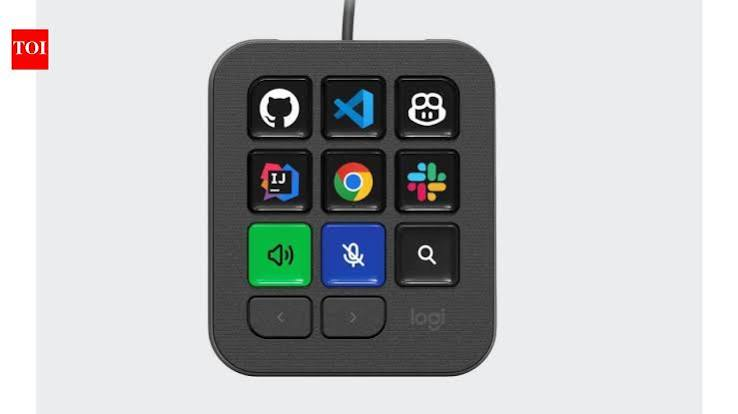
Artificial intelligence is changing the way software developers write and manage code, but working with several AI tools at once can also make the process more complicated. Logitech is taking a hardware-based approach to that problem with its new MX Keypad, a compact control panel designed specifically for modern coding and AI workflows.
Instead of relying entirely on keyboard shortcuts and switching between applications, developers can use physical keys to trigger frequently used commands, AI agents and automated actions.
A Keypad Built for the AI Coding Era
The MX Keypad features nine customizable full-colour LCD keys. Each key can be assigned to a specific command, prompt, macro or application, allowing users to create a control layout based on their individual workflow.
The keys can also change according to the application being used. This means the same physical controls can perform different functions when a developer moves between coding software and other applications.
Designed for Multiple AI Tools
One of the main ideas behind the device is reducing the amount of switching developers have to do while working with AI assistants.
The keypad supports workflows involving tools such as GitHub Copilot, Claude Code, VS Code and IntelliJ IDEA. Developers can use the controls to launch commands, manage AI agents and automate repetitive tasks.
Logitech has also worked with GitHub on the device, giving it native integration with the GitHub ecosystem and VS Code.
More Than Just Shortcut Buttons
The MX Keypad is not limited to traditional keyboard shortcuts.
Through Logitech’s software, users can assign prompts, scripts and macros to individual keys. Developers can also access community-created integrations and build their own tools through Logitech’s developer SDK.
This could be particularly useful for repetitive actions, such as launching a coding agent, running a command or triggering a frequently used AI prompt.
AI Hardware Is Becoming a New Category
The launch reflects a broader change in personal computing.
As AI assistants become part of everyday software development, companies are experimenting with physical interfaces designed specifically for interacting with them. Logitech’s approach suggests that AI productivity may not be limited to software alone.
Dedicated buttons could give users faster access to actions that would otherwise require several keyboard shortcuts, menus or application switches.
Logitech MX Keypad Price in India
The MX Keypad is available in India for ₹15,999. It connects through USB-C and works with Windows 10 or later and macOS 13 or later.
The device is compact enough to sit beside a regular keyboard, making it more of a companion control panel than a replacement for a conventional keyboard.
Could This Change the Way Developers Work?
The MX Keypad does not replace AI software or make coding itself automatic. Instead, its purpose is to make increasingly complex AI-assisted workflows easier to control.
Whether developers will want dedicated hardware for AI remains to be seen. But as coding agents and AI assistants become more deeply integrated into software development, physical controls like the MX Keypad could become an interesting new part of the developer workstation.